
Entertainment Center for TVs Up to 75 Inches
Discover how to choose the perfect media console for your large-screen TV. From dimensions and materials to cable management and style, we cover everything you need for a stunning home theater setup.
See Top PicksWhy Size Matters: A 75-inch TV is a significant investment, and the wrong entertainment center can compromise both safety and viewing experience. This guide walks you through the critical measurements, weight capacity requirements, and design considerations to help you make a confident purchase decision.
Why a Dedicated Entertainment Center Matters for Large TVs
A 75-inch television typically weighs between 50 and 80 pounds without a stand, and significantly more with one. Standard TV stands often lack the width, depth, and structural reinforcement needed to safely support a screen of this size. A purpose-built entertainment center provides a stable foundation, reduces the risk of tipping, and offers integrated storage for media devices, gaming consoles, and accessories. Beyond safety, the right unit elevates your viewing experience by positioning the screen at optimal eye level and reducing visual clutter. If you are redesigning your living space, pairing your media console with complementary pieces like a mid-century modern entertainment center or a wall entertainment center with fireplace can create a cohesive and inviting atmosphere.
Key Dimensions to Consider Before Buying
Getting the measurements right is the single most important step. A 75-inch TV measures approximately 65 to 67 inches across the diagonal screen, but the actual width of the television with its bezel is typically between 66 and 68 inches. Your entertainment center should be at least a few inches wider than the TV on each side to maintain visual balance and prevent accidental knocks.
| Measurement | Recommended Minimum | Why It Matters |
|---|---|---|
| Width | 70–75 inches | Provides a stable base and visual breathing room |
| Depth | 16–20 inches | Accommodates TV stand and cable clearance |
| Height | 20–28 inches | Ensures comfortable viewing angle from your sofa |
| Weight Capacity | 100+ lbs | Supports TV plus soundbar and peripherals safely |
| Shelf Clearance | 6–10 inches | Fits AV receivers, consoles, and media players |
Pro Tip: Always measure the width of your TV's stand or wall-mount bracket, not just the screen. Some 75-inch TVs have unusually wide feet that require a broader surface than expected. If you are also updating your kitchen or bathroom cabinetry, explore our guides on how to install cabinets and cabinet LED lighting for a cohesive home upgrade.
Materials and Build Quality: What to Look For
The material of your entertainment center directly impacts its durability, appearance, and ability to support a heavy TV. Solid wood and plywood are the gold standards for large-format furniture, offering superior strength and resistance to sagging over time. Engineered woods like MDF and particle board are more affordable but may require additional bracing for a 75-inch TV.
Solid Wood
Oak, maple, and walnut offer unmatched durability and natural beauty. Expect to pay $800–$2,500 for a quality solid wood unit. These pieces can last for decades and often become family heirlooms.
Plywood with Veneer
A strong mid-range option that resists warping better than particle board. Typically priced between $400–$1,200. Look for units with a minimum 3/4-inch thick panels for adequate support.
MDF and Particle Board
Budget-friendly options ranging from $150–$500. Suitable for smaller TVs, but for a 75-inch screen, verify the weight capacity and consider reinforcing the top panel with a solid wood board.
Hardware quality is equally important. Soft-close hinges, heavy-duty drawer slides, and adjustable leveling feet are signs of a well-constructed piece. If you are handy with DIY projects, you might consider building or upgrading your own unit — our guide on DIY cabinet projects and cabinet drawer slides replacement can help you get started.
Popular Styles for Modern Living Rooms
The style of your entertainment center should complement your existing décor while serving its practical purpose. Here are the most popular options for large TVs:
Modern Minimalist
Clean lines, floating shelves, and often wall-mounted designs that keep the floor clear. Perfect for contemporary spaces.
Farmhouse / Rustic
Reclaimed wood finishes, open shelving, and warm tones. Creates a cozy, inviting atmosphere in family rooms.
Mid-Century Modern
Tapered legs, rich walnut or teak finishes, and retro-inspired details. A timeless choice for design-conscious homeowners.
Traditional / Classic
Ornate moldings, closed cabinetry, and rich stains. Ideal for formal living rooms and traditional interiors.
If your living space doubles as a home office or guest area, consider multi-functional pieces like a room divider cabinet or a storage cabinet that can serve dual purposes. For those who appreciate vintage charm, a restored 1800s antique sideboard buffet with mirror or an oak sideboard can be repurposed as a unique entertainment console.
Cable Management and Organization Tips
A 75-inch TV setup typically involves multiple devices: a soundbar, streaming box, gaming console, and perhaps a cable box or Blu-ray player. Without proper cable management, your beautiful entertainment center can quickly become an eyesore. Look for units with built-in cable cutouts, ventilation slots, and adjustable shelving to keep everything tidy and cool.
- Choose a unit with rear cable management panels or grommets
- Ensure shelves have adequate ventilation for electronics
- Use velcro straps or cable ties to bundle wires neatly
- Consider a unit with closed cabinets to hide clutter
- Leave at least 2 inches of clearance around vents
- Label cables for easy troubleshooting later
For additional storage solutions, explore our guides on pull-out shelves, stackable plastic drawers, and wire storage racks to maximize every inch of your living space. If you are also organizing your kitchen, our articles on kitchen storage and corner kitchen cabinet storage solutions offer valuable insights.
Safety First: Preventing Tip-Overs and Damage
A 75-inch TV is heavy and top-heavy, making tip-over prevention critical — especially in homes with children or pets. Even the most stable entertainment center should be anchored to the wall using anti-tip straps or brackets. Additionally, ensure that the unit sits on a level floor and that adjustable feet are properly calibrated.
Safety Checklist: Anchor your entertainment center to the wall studs using heavy-duty straps. Avoid placing heavy items on the top shelf. Keep the TV positioned as far back as possible on the stand. Regularly inspect hardware for looseness. If you are mounting your TV on the wall instead, ensure the mount is rated for at least 1.5 times the weight of your television.
Budget Guide: What to Expect at Each Price Point
Entertainment centers for 75-inch TVs are available across a wide range of price points. Here is a realistic breakdown based on current market conditions:
Budget: $150–$400
Particle board construction, basic assembly required, limited weight capacity. Suitable for lighter TVs or temporary setups. Verify weight limits carefully before purchasing.
Mid-Range: $400–$900
Plywood or MDF with veneer, better hardware, more storage options. A solid choice for most households. Look for units with reinforced tops and adjustable shelving.
Premium: $900–$2,500+
Solid wood construction, soft-close hardware, integrated cable management, and designer finishes. These pieces are built to last and often come with manufacturer warranties.
When budgeting, do not forget to account for accessories such as cabinet LED lighting or cabinet with LED lighting to enhance the ambiance of your media area. If you are planning a broader home renovation, our kitchen remodel and countertops cost per square foot guides provide useful planning resources.
Frequently Asked Questions
What size entertainment center do I need for a 75-inch TV?
Look for a unit that is at least 70–75 inches wide to provide a stable base and visual balance. The depth should be at least 16 inches to accommodate the TV stand and cables, and the height should position the center of the screen at eye level when seated — typically 20–28 inches from the floor.
Can a standard TV stand hold a 75-inch TV?
Not always. Many standard TV stands are designed for TVs up to 55 or 65 inches. A 75-inch TV requires a stand with a higher weight capacity (100+ lbs) and a wider footprint. Always check the manufacturer's specifications before purchasing.
Is it better to wall-mount or use an entertainment center?
Both options have merits. Wall-mounting saves floor space and provides a clean, modern look. An entertainment center offers integrated storage, cable management, and a furniture-style aesthetic. For renters or those who prefer flexibility, a freestanding entertainment center is often the better choice.
How do I hide cables behind my entertainment center?
Use cable management panels, grommets, or adhesive cable clips. Bundle cables with velcro straps and route them through the back of the unit. If your entertainment center has open shelving, consider adding decorative baskets or boxes to conceal smaller items and wires.
What is the best material for a large TV entertainment center?
Solid wood and plywood are the best choices for durability and weight-bearing capacity. Engineered woods like MDF can work well if the unit is properly braced and the weight capacity is clearly stated by the manufacturer. Avoid particle board units that lack reinforcement for a 75-inch TV.
Recommended Entertainment Centers for TVs Up to 75"
⚠️ AFFILIATE DISCLOSURE: This website contains affiliate links. As an affiliate Associate, we earn from qualifying purchases. If you make a purchase through these links, we may receive a small commission at no additional cost to you. Read our full affiliate policy.

Nordivale White Farmhouse TV Stand, Entertainment Center, 98" Wall Unit Media Console with Bookshelf, Cabinet & Power Outlets & Barn Doors, Fits TVs Up to 75” for Living Room
Check price on Amazon
WLIVE 65 Inch Farmhouse TV Stand with Storage & Power Outlet , Black | Fits TVs Up to 75 Inch, Entertainment Center for living room, TV Console with Drawers &Adjustable Shelves, Media Console
Check price on Amazon
AeasyG 94" Entertainment Center with Bookshelves for TVs up to 70" (White) | Large Wall Unit TV Stand, Modern Wood Media Console with Power Outlet, TV Entertainment Center with Storage for Living Room
Check price on Amazon
OneBlis 98" Farmhouse TV Stand with 36" Electric Fireplace, Bookshelves, Fits 75" TVs, Entertainment Center with Storage Cabinet, Large Wall Unit Media Console for Living Room, White
Check price on Amazon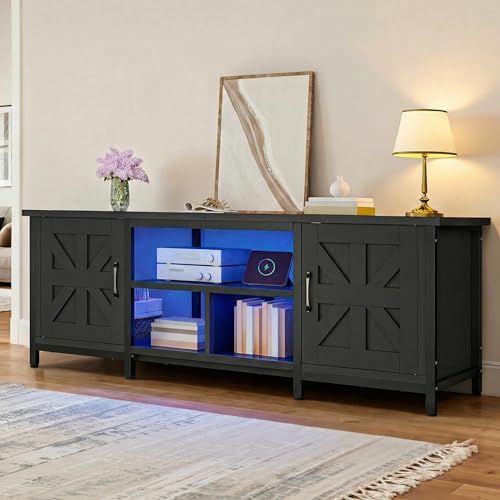
DWVO Farmhouse TV Stand with Power Outlets for TVs up to 75 Inch, Black | Entertainment Center with LED Lights, Storage Cabinets & Adjustable Shelves, Media Console Table for Living Room
Check price on Amazon
Decofy Mid Century TV Stand for TVs up to 80 Inches, Entertainment Center with Storage, Power Outlet, Fluted Sliding Doors & Adjustable Shelves, Modern Media TV Console Table for Living Room (Walnut)
Check price on Amazon
SONGMICS TV Stand for TVs Up to 70 Inches | Entertainment Center, Media Consolefor living room,Fabric Drawer,Ink Black, BELLAH Collection ULGS131B101S
Check price on AmazonFinal Thoughts: Making the Right Choice
Choosing an entertainment center for a 75-inch TV is about balancing safety, style, and functionality. Prioritize units with adequate weight capacity, solid construction, and thoughtful cable management features. Measure your space carefully, consider your viewing habits, and select a design that complements your home's aesthetic. With the right entertainment center, your large-screen TV becomes the centerpiece of a comfortable, organized, and visually stunning living room. For more inspiration on organizing and styling your home, explore our guides on home office setups, dining table selections, and glass display cabinets to create a cohesive living environment.