
Entertainment Center with TV Mount 65 Inch: The Complete Buying Guide
Everything you need to know before choosing a media console that securely holds, displays, and organizes your 65-inch television — from sizing and weight capacity to materials, cable management, and style.
See Recommended ModelsWhy this guide matters: A 65-inch TV is one of the most popular screen sizes on the market, but it is also heavy, wide, and sensitive to placement. Choosing the wrong entertainment center can lead to wobbling, poor viewing angles, blocked ventilation, or even a safety hazard. This guide walks you through every decision point so you can buy with confidence.
Why a 65-Inch TV Demands a Purpose-Built Entertainment Center
A 65-inch television typically weighs between 40 and 70 pounds without its stand, and its width often exceeds 56 inches. That means a generic TV stand or a lightweight bookshelf simply will not do. An entertainment center with a dedicated TV mount for a 65-inch screen is engineered to handle that weight, distribute it safely, and position the screen at the optimal viewing height.
Beyond safety, the right unit solves real everyday problems: where do the streaming devices go, how do you hide the tangle of HDMI and power cables, and how do you keep the room looking intentional rather than cluttered? A well-designed media console answers all three. If you also need display storage for collectibles or media, a curio display cabinet with glass doors can complement the setup beautifully in the same room.
This guide is written for buyers who already know they want a 65-inch TV setup and are now comparing specific furniture options. We will cover dimensions, weight ratings, mounting methods, materials, ventilation, cable management, and styling — then point you toward the best current models.
Entertainment Center Dimensions for a 65-Inch TV
Getting the dimensions right is the single most important step. A unit that is too narrow looks unstable; one that is too tall forces you to crane your neck. Use the table below as a practical reference.
| Measurement | Recommended Range | Why It Matters |
|---|---|---|
| TV Stand Width | 58–70 inches | Wider than the TV for visual balance and stability |
| Stand Depth | 15–20 inches | Accommodates media players, receivers, and ventilation |
| Stand Height | 20–28 inches | Keeps the screen center near eye level when seated |
| Weight Capacity | 80–150 lbs | Safety margin above the TV's own weight |
| VESA Compatibility | 200x200 to 600x400 mm | Matches the mounting pattern on most 65-inch TVs |
A good rule of thumb: the furniture should be at least as wide as the TV, and ideally 2–4 inches wider on each side. For a 65-inch screen, that puts you in the 58–70 inch range. If your room is tight, a floor TV stand with a built-in 65-inch mount can be a space-efficient alternative that still provides secure mounting.
Types of Entertainment Centers with TV Mounts
1. Freestanding Media Consoles with Integrated Mounts
These units combine a storage cabinet base with a built-in TV mount, usually a swivel or fixed bracket. They are the most popular choice because they offer storage, cable management, and mounting in one piece of furniture. Many models include adjustable shelving and a swivel function so you can angle the screen toward different seating positions.
2. Wall-Mounted Entertainment Centers
Wall-mounted designs attach the TV bracket directly to the wall, with a floating shelf or cabinet below. They save floor space and create a clean, modern look, but they require proper wall anchoring and are less flexible if you rearrange furniture. For a coordinated living room, a wood and glass display cabinet with lights can sit alongside to showcase decor without competing with the TV.
3. Corner Entertainment Centers
Corner units are ideal for rooms where the TV must sit diagonally. They use otherwise wasted space and often include angled mounting brackets. If your layout is awkward, a tall corner storage cabinet with doors and shelves can add extra storage nearby without blocking sightlines.
4. Fireplace Media Consoles
These combine an electric fireplace with a TV mount and storage. They add warmth and ambiance, and many models allow the fireplace to be used with or without heat. A home entertainment center with fireplace is a strong option for living rooms that double as gathering spaces.
5. Farmhouse and Rustic Styles
For a warmer, more traditional look, farmhouse-style consoles feature distressed finishes, open shelving, and barn-door accents. A farmhouse entertainment center with bookshelves blends storage and display with a cozy aesthetic that pairs well with wood storage cabinets with doors used elsewhere in the home.
Key Features to Look For
Weight Capacity and Build Quality
Check the manufacturer's stated weight limit and compare it to your TV's weight plus the mount and any accessories. A safe margin is at least 20–30 pounds above the total load. Solid wood and thick engineered wood outperform thin particle board, especially at the joints and mounting points.
VESA Compatibility
VESA patterns describe the distance between the four mounting holes on the back of your TV. Most 65-inch TVs use 200x200, 300x300, 400x200, 400x400, or 600x400 mm patterns. Confirm the entertainment center supports your specific TV's VESA size before buying.
Swivel and Tilt Function
A swivel mount lets you angle the TV toward the kitchen, dining area, or a second seating zone. Tilt is useful if the TV sits higher than eye level. Fixed mounts are the most stable but least flexible.
Cable Management
Look for cutouts, channels, or hidden compartments for routing power and HDMI cables. Good cable management keeps the setup clean and prevents cables from being pinched or pulled. If your home office shares the space, a computer desk with a matching file cabinet can use similar cable-routing principles.
Ventilation
Electronics generate heat. Enclosed cabinets need ventilation gaps, mesh panels, or open backs. Never fully seal a game console or receiver inside a closed compartment without airflow.
Adjustable Shelving
Adjustable shelves let you reconfigure the space as your equipment changes. This is especially useful if you plan to add a soundbar, subwoofer, or media players over time.
Materials and Finishes
The material affects durability, weight, appearance, and price. Here is a quick comparison:
| Material | Durability | Price Range | Best For |
|---|---|---|---|
| Solid Wood | Excellent | $800–$2,500 | Long-term investment, heavy TVs |
| Engineered Wood (MDF/Plywood) | Good | $300–$900 | Most households, good value |
| Metal Frame + Wood Shelves | Very Good | $400–$1,200 | Modern industrial style |
| Glass and Metal | Good | $350–$1,000 | Sleek contemporary rooms |
If you want a coordinated look across rooms, matching finishes with existing cabinetry helps. A cabinet with doors in the same wood tone can unify the space, while a cabinet door style guide can help you choose a door profile that complements your entertainment center.
Placement and Setup Tips
- Position the center of the screen at seated eye level, typically 40–50 inches from the floor.
- Leave at least 2–3 inches of clearance behind the unit for cables and airflow.
- Anchor the entertainment center to the wall if it is tall or if you have children or pets.
- Use a stud finder or heavy-duty wall anchors rated for the combined weight of the unit and TV.
- Keep the TV away from direct sunlight to reduce glare and heat exposure.
- Test the swivel range before finalizing placement so the TV does not hit nearby walls or furniture.
- Label cables during setup to make future changes easier.
If you are also reorganizing storage in the same room, a built-in cabinets guide can help you plan integrated shelving that matches the entertainment center. For rooms with limited space, bathroom storage cabinets are a separate but useful reference for compact organization principles.
Recommended Entertainment Centers for 65-Inch TVs
⚠️ AFFILIATE DISCLOSURE: This website contains affiliate links. As an affiliate Associate, we earn from qualifying purchases. If you make a purchase through these links, we may receive a small commission at no additional cost to you. Read our full affiliate policy.

BTHFST LED TV Stand with Mount for Living Room, 55, 60, 70 TV, 6 Drawers | Black 51.2" TV Stand with storage, Power Outlets, Entertainment Center with TV Mount, Media Console, Living Room, Bedroom
Check price on Amazon
JUSTOGO TV Stand with Mount, Entertainment Center for 55 60 65 inch, Brown | TV Console with Drawers & Led Lights, AC Outlets & USB Ports, For Living Room, Bedroom, Height Adjustable, Swivel TV Cabinet
Check price on Amazon
CHOEZON TV Stand with Mount, Power Outlet and LED Light, Entertainment Center, Adjustable TV Stand, for 32-70 inch TVs, 2-Tier Storage, for Living Room, Bedroom, Rustic Brown and Black TDS13UDBF
Check price on Amazon
Lamtor TV Stand with Mount for 65-75 Inch TV, Fluted Walnut Media Console | Modern entertainment center with power outlet, adjustable mount, textured fluted doors and spacious storage for living room
Check price on Amazon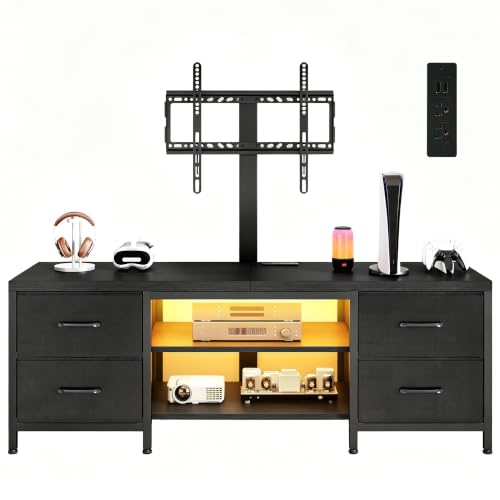
Homiflex TV Stand with Mount for 75 Inch TV, w/LED & Outlets, 59'' Black | TV Media Console for Bedroom/Living Room, Industrial Modern Entertainment Center with 4 Fabric Drawers, Open Shelves
Check price on Amazon
HOOBRO TV Stand with Mount and Power Outlet, LED Entertainment Center with Swivel TV Mount for 32/45/55/60/65/70/75 inch TVs, TV Cabinet with 3-Tier Storage, for Living Room, Bedroom, Black BB46UDDS01
Check price on Amazon
CHOEZON TV Stand with Mount, Power Outlet and LED Light, Entertainment Center, Adjustable TV Stand, for 32-70 inch TVs, 2-Tier Storage, for Living Room, Bedroom, Rustic Brown and Black TDS12UDBF
Check price on AmazonCommon Buying Mistakes to Avoid
- Ignoring the weight rating. A stand that looks sturdy may still be rated below your TV's weight once the mount is attached.
- Buying too narrow. A stand narrower than the TV looks unstable and may not support the mounting bracket properly.
- Forgetting VESA compatibility. Not every mount fits every TV. Always check the mounting pattern.
- Overlooking cable management. A lack of routing options leads to visible clutter and potential cable damage.
- Skipping ventilation checks. Enclosed cabinets without airflow can overheat electronics and shorten their lifespan.
- Not anchoring tall units. Tip-over accidents are preventable with proper wall anchoring.
Frequently Asked Questions
What size entertainment center do I need for a 65-inch TV?
Look for a unit at least 58 inches wide, ideally 60–70 inches, with a depth of 15–20 inches and a weight capacity of at least 80–150 pounds. The stand should be wider than the TV for balance and stability.
Can I mount a 65-inch TV on any entertainment center?
No. The entertainment center must be designed with a compatible VESA mount and rated for the TV's weight. Always check the manufacturer's specifications for both VESA pattern and load capacity.
Is a swivel mount worth it for a 65-inch TV?
Yes, if you watch from multiple seating positions or want to angle the screen toward a kitchen or dining area. Swivel mounts add flexibility but may reduce maximum weight capacity slightly compared to fixed mounts.
How high should a 65-inch TV be mounted?
The center of the screen should be at or slightly below seated eye level, typically 40–50 inches from the floor. This reduces neck strain and improves viewing comfort.
Do I need to anchor my entertainment center to the wall?
Yes, especially for tall units or homes with children and pets. Wall anchoring prevents tip-over accidents and adds stability, particularly when the TV is mounted on the unit itself.
What is the best material for a 65-inch TV entertainment center?
Solid wood offers the best durability and weight capacity, typically in the $800–$2,500 range. Engineered wood (MDF or plywood) provides good value at $300–$900 for most households. Metal frames with wood shelves are a strong middle option at $400–$1,200.
Ready to Upgrade Your Living Room?
A properly sized entertainment center with a secure TV mount transforms your 65-inch screen from a fragile placement into a polished, organized focal point. Compare the recommended models above and choose the one that fits your space, style, and budget.
View Top PicksFinal Thoughts
Choosing an entertainment center with a TV mount for a 65-inch screen comes down to four things: correct sizing, sufficient weight capacity, VESA compatibility, and thoughtful cable and ventilation design. Get those right, and the rest is style preference.
Measure your space, check your TV's VESA pattern and weight, decide whether you need swivel or fixed mounting, and pick a material that matches your budget and room aesthetic. With those decisions made, you will have a setup that is safe, functional, and visually cohesive for years to come.
For related storage and organization ideas, explore our guides on cabinet pantries, kitchen cabinets and bathroom vanities, and cabinets with doors to create a fully coordinated home.