
Built-In TV Cabinet: The Ultimate Guide to Design, Storage & Buying
A built-in TV cabinet transforms your living room into a streamlined entertainment hub. Discover how to choose the perfect media wall, integrate smart storage, and select materials that balance style with function.
Start Your ResearchWhy a Built-In TV Cabinet Is Worth the Investment
A built-in TV cabinet is more than just a place to set your television. It is a permanent, custom-fitted furniture piece that merges your entertainment system with your home's architecture. Unlike freestanding TV stands, a built-in unit is designed to fit your wall precisely, eliminating wasted space and creating a seamless, high-end look.
If you have been searching for a way to reduce clutter, hide cables, and display your media collection elegantly, a built-in solution is likely your best answer. These cabinets can be designed as part of a larger entertainment center with storage or as a standalone feature wall. The key is planning before you buy or build.
Quick Insight: Built-in TV cabinets are typically custom-made or semi-custom, meaning they are fabricated to fit your specific wall dimensions. This is different from a stock tall TV table stand, which comes in fixed sizes.
Types of Built-In TV Cabinets: Which Style Fits Your Home?
There is no one-size-fits-all approach to built-in media furniture. Your choice depends on your room layout, storage needs, and aesthetic preferences. Here are the most common configurations:
1. Full-Wall Media Wall
This design spans the entire width of your wall, floor to ceiling. It often includes a central niche for the TV, flanked by cabinets, shelves, and drawers. A full-wall unit is ideal for large living rooms and provides maximum storage. If you want a dramatic focal point, this is the most impressive option.
2. Floating Built-In Cabinet
A floating unit is mounted to the wall without legs, creating a sleek, contemporary look. It can be a single long cabinet or a combination of wall-mounted boxes. This style works well in smaller rooms because the open floor space beneath makes the room feel larger. For a cohesive living room, consider pairing it with a freestanding wall unit for living room in an adjacent area.
3. Corner Built-In TV Cabinet
If your TV is positioned in a corner, a custom corner unit maximizes that awkward space. These cabinets often feature angled TV mounts and triangular or L-shaped storage below. Corner units are excellent for open-plan homes where the living area is defined by furniture placement rather than walls.
4. Built-In TV Cabinet with Fireplace
Combining a TV and an electric or gas fireplace into one built-in unit creates a cozy, luxurious atmosphere. The fireplace is usually placed below the TV, with storage on either side. This design is popular in modern homes and can be achieved with a modern TV fireplace stand as a starting point for inspiration before going fully custom.
5. Entertainment Center for Gaming
For gamers, a built-in cabinet must accommodate consoles, controllers, and ventilation. A dedicated entertainment center for gaming console includes shelves with cable management, cooling vents, and drawers for accessories. This is a specialized sub-type of built-in TV cabinet that prioritizes function for gaming setups.
Pros and Cons of Built-In TV Cabinets
Before committing to a built-in unit, weigh the advantages against the limitations. This will help you decide if custom cabinetry is the right path for your home.
✅ Advantages
- Custom Fit: No gaps or wasted space; designed for your exact wall.
- Increased Property Value: Built-ins are considered a permanent upgrade.
- Superior Organization: Hide wires, routers, and media accessories behind doors.
- Aesthetic Appeal: Creates a clean, integrated look that elevates your interior design.
- More Storage: Often includes drawers, adjustable shelves, and cabinets.
⚠️ Considerations
- Higher Upfront Cost: Custom work is more expensive than stock furniture.
- Permanent Installation: Difficult to move or rearrange later.
- Longer Lead Time: Design, fabrication, and installation take weeks or months.
- Requires Planning: You must account for TV size, ventilation, and future tech upgrades.
Materials and Finishes for Built-In TV Cabinets
The material you choose affects durability, appearance, and cost. For a built-in unit, you want materials that can handle the weight of a TV and components while resisting warping and heat.
- Plywood: The gold standard for cabinet boxes. It is strong, holds screws well, and resists moisture. Recommended for long-term installations.
- MDF (Medium-Density Fiberboard): Excellent for painted doors and panels because it has a smooth, uniform surface. However, it is heavy and can sag under heavy loads if not properly supported.
- Particle Board: A budget-friendly option often used in stock cabinets. It is not ideal for heavy built-ins unless reinforced. If you are considering a more economical route, you might look at wood kitchen cabinets as a reference for material quality comparisons.
- Solid Wood: Used for face frames, doors, and trim. Provides a premium look and feel but is more expensive and can expand or contract with humidity.
For finishes, painted cabinets (especially white, gray, or navy) are popular for built-ins because they blend seamlessly with walls. Wood veneers and laminates offer a natural grain look with less maintenance. If you plan to paint your existing cabinets or a new unit, review our guide on painting bathroom cabinets for surface prep techniques that apply to any cabinetry project.
Essential Design and Storage Features to Include
A well-designed built-in TV cabinet should be more than a box. It should be a functional piece of furniture that serves your daily life. Here are features to prioritize:
Cable Management
Plan for grommets, raceways, or hidden channels behind the TV and inside cabinets. This prevents tangled wires and makes it easy to add or remove devices. If you are installing the unit yourself, our cabinet installation accessories hub has tools and tips for clean wiring.
Ventilation
Electronics generate heat. Ensure your cabinet has vents or open back panels to allow airflow. Enclosed cabinets with glass doors can trap heat, so consider using mesh panels or installing small fans.
Adjustable Shelving
Adjustable shelves let you reconfigure the space as your media collection or equipment changes. This is especially important if you upgrade to a larger TV or add a soundbar.
Drawers and Doors
Drawers are ideal for storing remotes, batteries, and small accessories. Doors hide larger items like receivers, DVD players, and game consoles. A combination of both is usually best. For door style options, see our guide on types of cabinet doors to match your home's interior.
Lighting
Integrated LED lighting can highlight display shelves or provide ambient light. Puck lights or LED strips are easy to install and energy-efficient. A built-in unit with lighting becomes a true focal point, similar to a curio cabinet with lights.
Buying Guide: How to Choose the Right Built-In TV Cabinet
When you are ready to purchase or commission a built-in TV cabinet, use this checklist to ensure you make a confident decision.
1. Measure Your Space and TV
Measure the width, height, and depth of your wall. Also, measure your TV (including the stand if you are not wall-mounting it). Leave at least 2–3 inches of clearance on all sides of the TV for ventilation and aesthetics. If you have a small space, consider a tall TV table stand as a temporary or alternative solution.
2. Determine Your Budget
Built-in TV cabinets are a significant investment. Current market prices for custom or semi-custom built-ins range from $1,200 to $6,500+, depending on size, materials, and complexity. A simple floating cabinet may start around $800, while a full-wall media center with fireplace and lighting can exceed $10,000. For a more affordable ready-to-assemble option, a modern TV fireplace stand can be a cost-effective starting point.
3. Choose Custom vs. Semi-Custom
Fully custom cabinets are made to your exact specifications and offer unlimited design freedom. Semi-custom cabinets use standard sizes but allow you to choose finishes, door styles, and some dimensions. Stock cabinets are the most affordable but rarely fit a built-in application perfectly.
4. Plan for Future Technology
Technology changes quickly. Make sure your cabinet can accommodate a larger TV in the future, additional gaming consoles, or a soundbar. Leave extra space and conduit for cables.
5. Hire a Professional Installer
Built-in cabinets require precise installation. Unless you are an experienced carpenter, hire a professional. They will ensure the unit is level, secure, and properly integrated with your wall. If you are installing a simpler wall-mounted unit, our cabinet installation accessories hub provides guidance on anchors, screws, and leveling.
Pro Tip: Always ask for a detailed drawing or 3D rendering before fabrication begins. This allows you to visualize the final result and make changes before materials are cut.
Built-In TV Cabinet vs. Other Media Furniture
How does a built-in compare to freestanding options? This table breaks down the key differences.
| Feature | Built-In TV Cabinet | Freestanding TV Stand | Entertainment Center |
|---|---|---|---|
| Fit | Custom to wall | Standard sizes | Standard or semi-custom |
| Storage | High (drawers, shelves, cabinets) | Low to moderate | Moderate to high |
| Cost | $1,200–$6,500+ | $150–$800 | $400–$2,500 |
| Installation | Professional recommended | DIY-friendly | Assembly required |
| Mobility | Permanent | Movable | Movable |
| Aesthetic | Integrated, high-end | Varied | Traditional |
Recommended Built-In TV Cabinets & Media Consoles
⚠️ AFFILIATE DISCLOSURE: This website contains affiliate links. As an affiliate Associate, we earn from qualifying purchases. If you make a purchase through these links, we may receive a small commission at no additional cost to you. Read our full affiliate policy.

Nordivale White Farmhouse TV Stand, Entertainment Center, 98" Wall Unit Media Console with Bookshelf, Cabinet & Power Outlets & Barn Doors, Fits TVs Up to 75” for Living Room
Check price on Amazon
OneBlis 98" Farmhouse TV Stand with 36" Electric Fireplace, Bookshelves, Fits 75" TVs, Entertainment Center with Storage Cabinet, Large Wall Unit Media Console for Living Room, White
Check price on Amazon
YITAHOME 59" TV Stand with Power Outlet & LED Light for 65 Inch TVs, Black | Farmhouse Entertainment Center with Storage Cabinets, Media Console Living Room Furniture
Check price on Amazon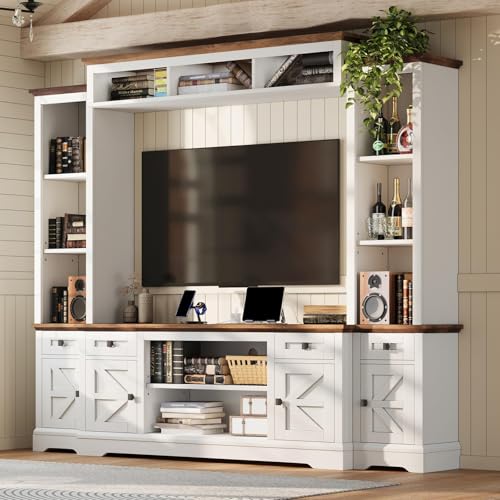
AMERLIFE 98" Farmhouse Wall Unit Entertainment Center with Bookshelf | Large Media Console for TVs up to 75", Rustic TV Cabinet with Power Outlets & Barn Door for Living Room, Off-White
Check price on Amazon
Breezestival Black Farmhouse TV Stand with Fireplace, Entertainment Center, 98" Wall Unit Media Console with Bookshelf, Cabinet & Power Outlets & Barn Doors, Fits TVs Up to 75” for Living Room
Check price on Amazon
Modular Entertainment Center with All-Glass Door Cabinets, 126" Large TV Wall Unit, Media Console with Bookshelves and Arched Tops, Fits 70 Inch TV, Modern White Display Credenza Storage System
Check price on Amazon
Nordivale 98" Farmhouse TV Stand with 36" Fireplace, Black & Black | Media Entertainment Center with Fireplace,Adjustable Shelves & Large Storage Cabinets, Fits TVs Up To 100", For Living Room
Check price on AmazonFinal Thoughts: Making the Right Choice
A built-in TV cabinet is a long-term investment that can dramatically improve the look and functionality of your living room. By understanding the different types, materials, and design features, you can make an informed decision that suits your home and lifestyle.
Whether you choose a full-wall media center, a sleek floating unit, or a corner design, the key is to plan carefully and prioritize quality craftsmanship. If you are still exploring storage solutions for other rooms, you may find inspiration in our guides on entertainment centers with storage or freestanding wall units.
Ready to Upgrade Your Living Room?
Browse our recommended built-in TV cabinets and media consoles above to find the perfect fit for your home.
View Recommended Products